What is a webhook? A plain-English guide
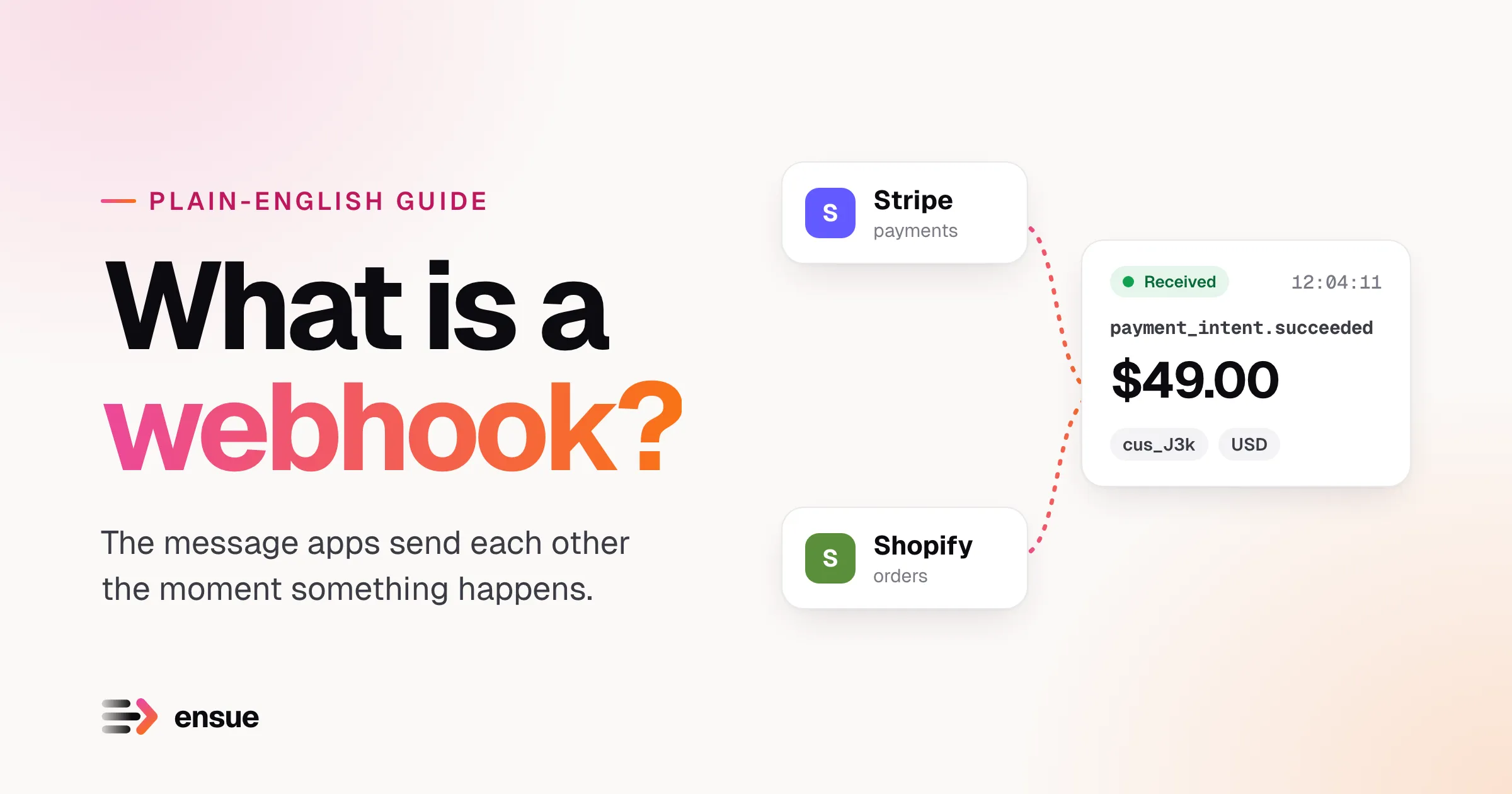
You’ve probably used webhooks today without knowing it. When a customer pays on your website and your accounting tool updates a second later, or a teammate merges code and a Slack message pops up, a webhook did that.
This guide explains what a webhook is, how it differs from the alternatives, and where it goes wrong, using everyday examples. You don’t need to write code to follow it.
The short answer
A webhook is a message one app sends to another app, automatically, the moment something happens.
That’s it. Instead of you checking a service over and over (“any new orders yet?”), the service tells you when there’s news (“new order, here are the details”).
An everyday analogy: the pizza shop
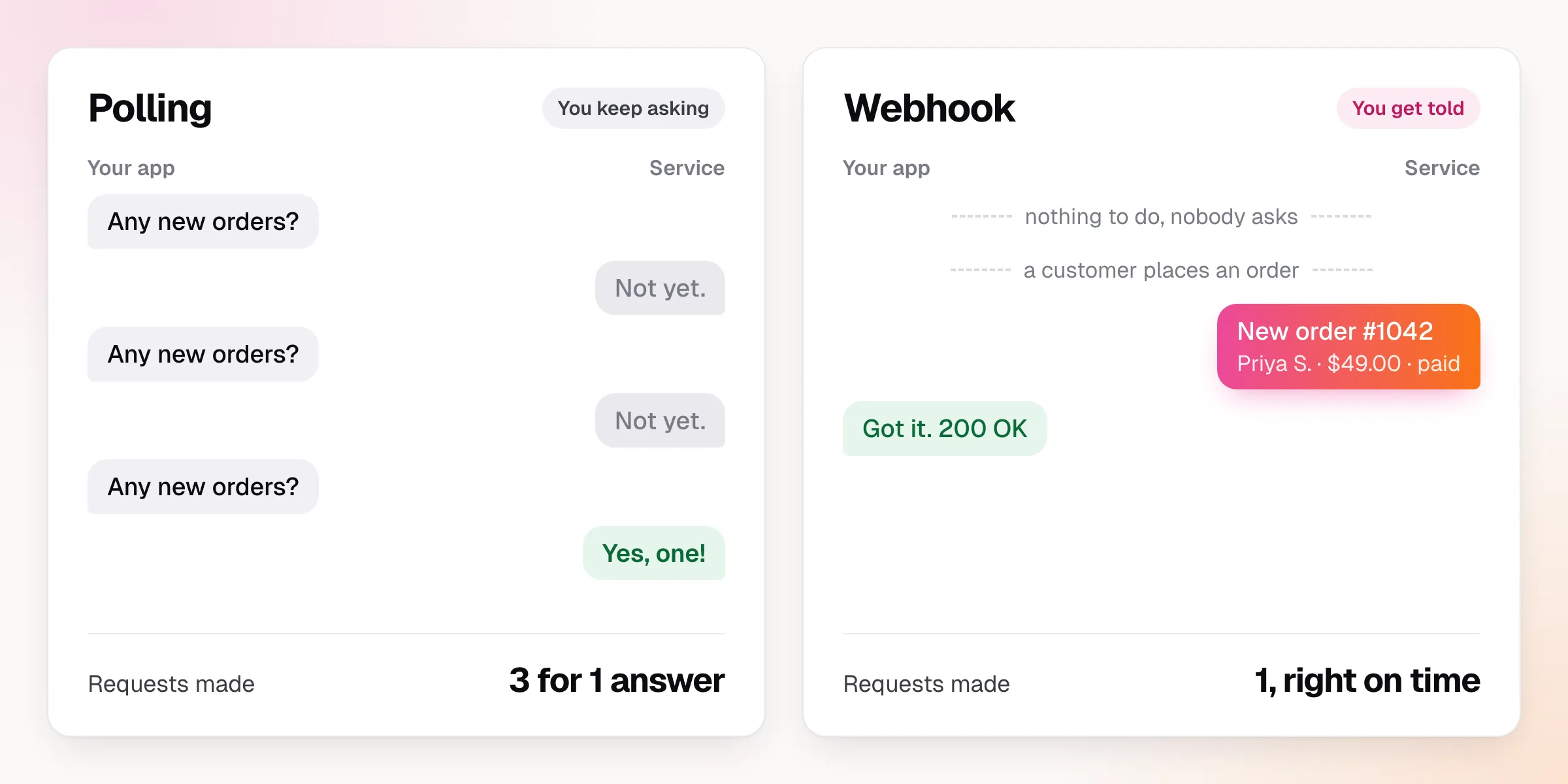
Imagine you order a pizza and want to know when it’s ready. There are two ways to find out.
- You call the shop every five minutes and ask, “Is my pizza ready yet?” Most calls are wasted (“not yet”), and you might still find out late.
- You give them your number and they call you when it’s out of the oven. One call, at the right moment.
The first approach is called polling. The second is a webhook. The phone number you left is your webhook URL: the address where the other side should send the news.
Why people use them
| Polling | Webhook | |
|---|---|---|
| Speed | As slow as your check interval | Near-instant |
| Wasted effort | Most checks find nothing | Only runs when something happens |
| Cost | Constant traffic, even when idle | Traffic matches real activity |
| Setup | You write the checking loop | You give a URL, the service does the rest |
Because webhooks are fast and cheap, almost every modern service offers them.
Real examples you’d recognise
- Stripe: a payment succeeds, so Stripe sends
payment_intent.succeededto your app, which marks the order as paid and emails the receipt. - Shopify: a customer places an order, and Shopify notifies your warehouse system so it can start picking and packing.
- GitHub: someone pushes code, and your build system starts a new test run.
- Calendly: someone books a call, and your CRM creates a lead and assigns it to a salesperson.
- Twilio: a text message arrives, and your support tool opens a ticket.
In every case, the pattern is the same: something happens in service A, and service A tells service B.
What’s inside a webhook
A webhook is a small web request, a bit like a letter with an address on the envelope and a note inside. Here’s what a payment notification from Stripe looks like:
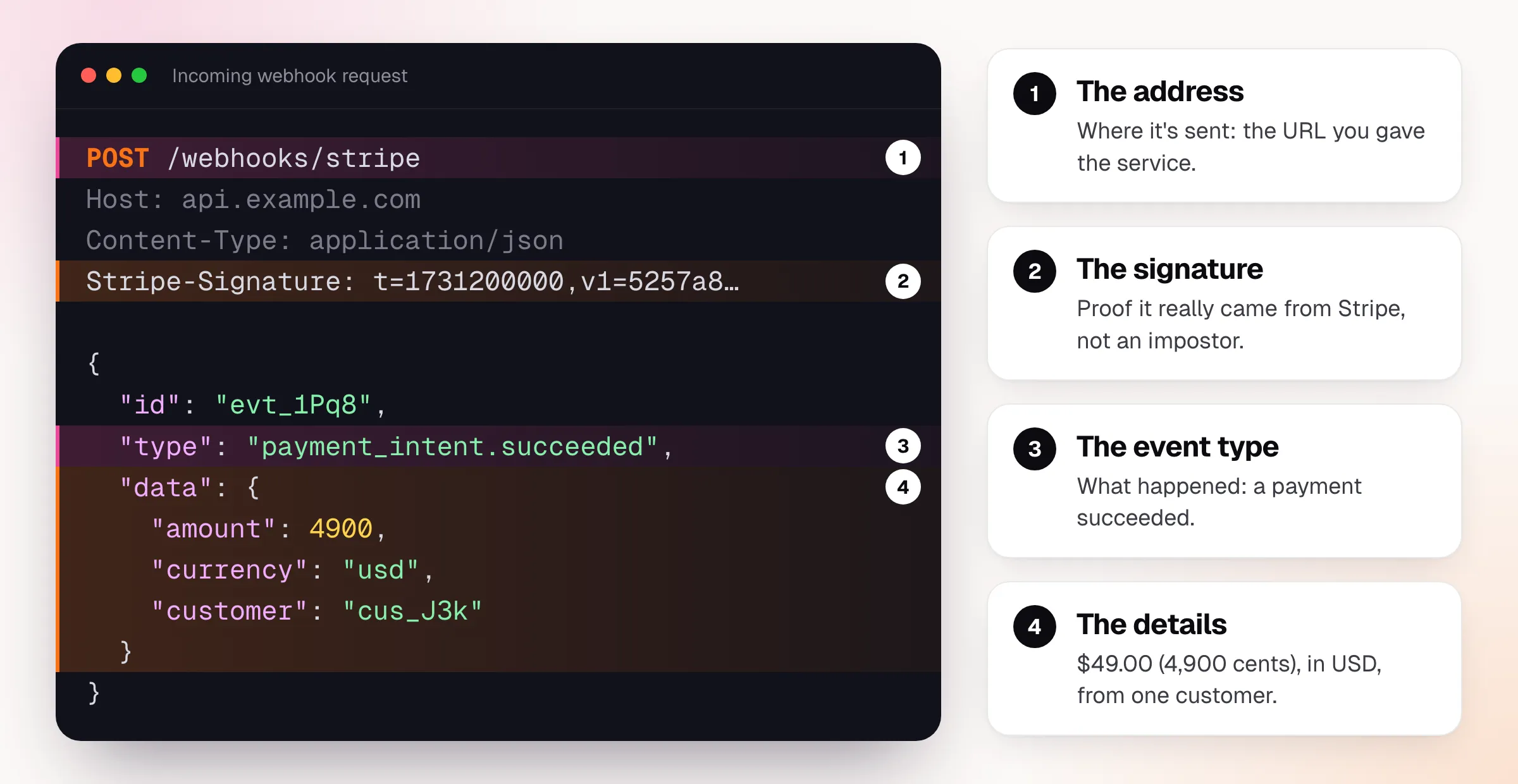
Four parts matter:
- The address is your URL. You choose it and give it to the sender once.
- The signature is a secret stamp that proves the message really came from Stripe and not someone pretending to be them. Skipping this check is one of the most common security mistakes.
- The event type says what happened (
payment_intent.succeeded,order.created,ticket.closed). - The details are the facts, usually as JSON, a simple text format both humans and software can read.
The 4900 above means 4,900 cents, so $49.00. Many payment services count in the smallest currency
unit to avoid rounding errors.
How to set one up
Setting up a webhook usually takes three steps, and you can do most of it from a settings screen:
- Get a URL that can receive messages. This is the part that needs a developer or a tool.
- Paste the URL into the sending service, usually under Settings → Webhooks or Developers.
- Choose the events you care about, like “payment succeeded” and “refund created”, so you’re not flooded with everything.
Then the service sends a test event. If your URL answers with a success code (a 200), you’re connected.
Where webhooks go wrong
Webhooks are simple on a good day. The trouble starts on a bad one. Almost every team that depends on them runs into the same four problems.
1. Your server is down when the message arrives. A deploy, a restart or an outage means the sender gets no answer. Some services retry for a while and then give up. That order is now missing from your system, and nobody tells you.
2. The same message arrives twice. Senders retry when they don’t get a quick reply, so duplicates are normal. Without protection, a customer can be charged, emailed or shipped to twice.
3. A flood arrives all at once. A flash sale or a big import can send thousands of messages in seconds, more than your system can swallow.
4. Nobody can tell what happened. When a customer says “I paid but nothing happened”, you need to know whether the message arrived, was understood, and was acted on. Without a record, you’re guessing.
How a gateway fixes this
A webhook gateway sits in the middle. Senders talk to the gateway, and the gateway talks to your app.
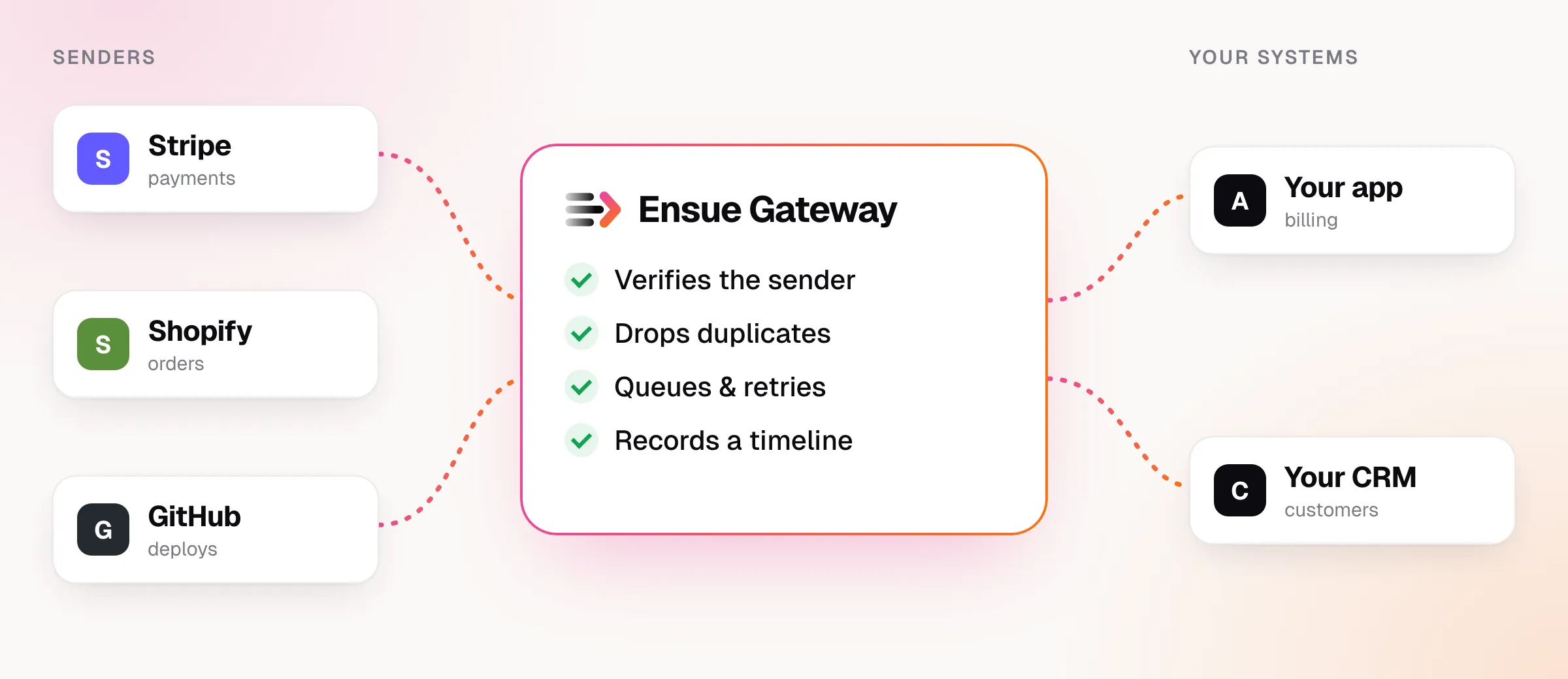
Because the gateway is always on, it answers senders immediately and keeps every message safe, even when your own systems are down. Then it hands the messages to your app at a pace the app can handle.
That is what Ensue Gateway does. For each sender you get a unique URL. Ensue then:
- checks the signature before anything else, and refuses fakes,
- ignores duplicates, so a repeat creates nothing,
- queues and retries with increasing waits when your app is unavailable,
- pauses a failing destination instead of hammering it, and
- records a timeline for every message.
Here is what that last part looks like when your server has a bad moment:
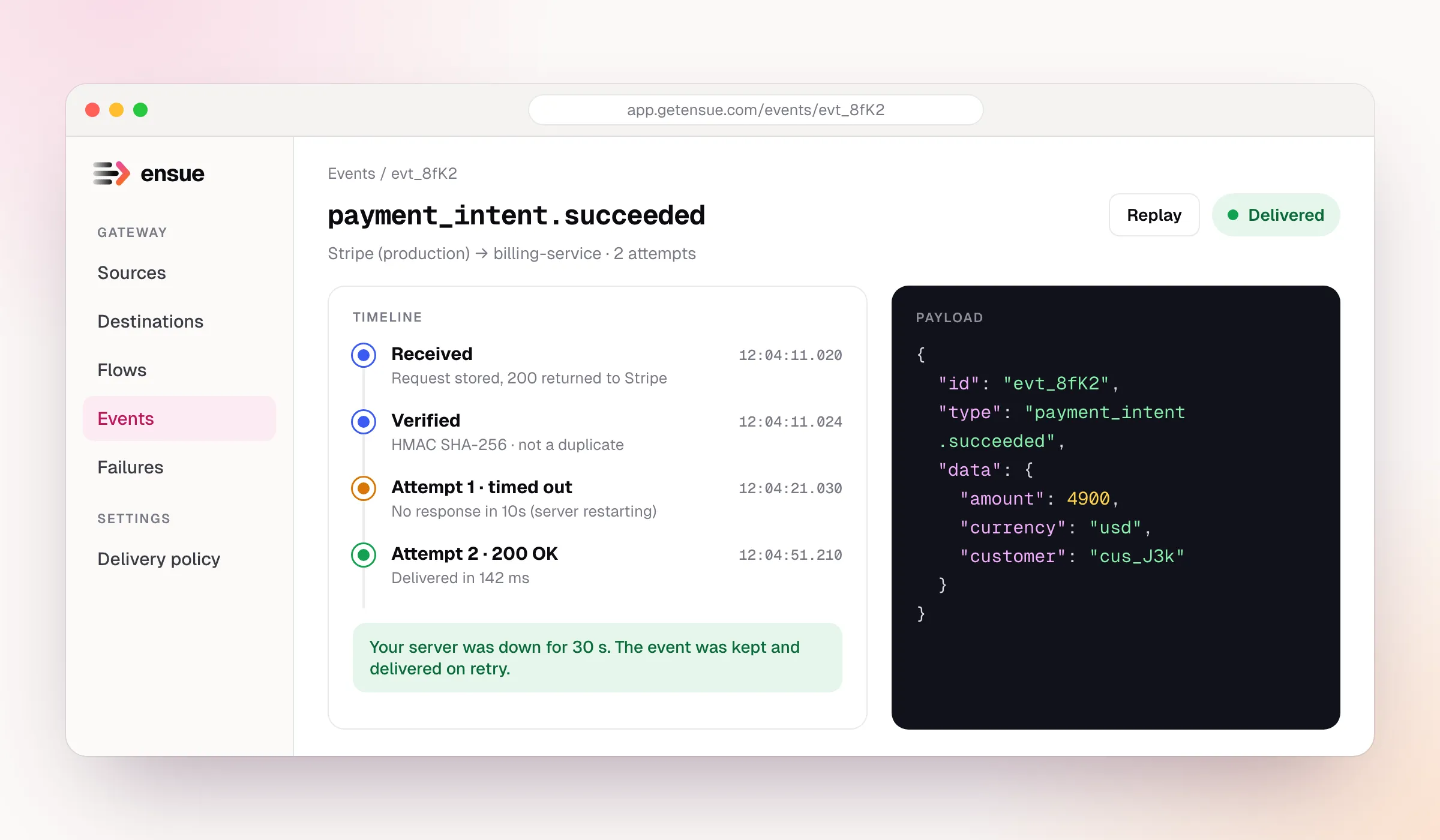
Without a gateway, that payment would have vanished the moment your server was restarting. With one, it was delivered 40 seconds later and you can see exactly why it was late.
Try it yourself
You can see a webhook arrive in about five minutes. Here is the shortest path:
- Create an Ensue account and add a destination (any URL that can receive requests).
- Create a source. Ensue gives you a URL like
https://hooks.getensue.com/in/<token>. - Connect them with a flow.
- Send yourself a test message:
curl -X POST https://hooks.getensue.com/in/<token> \
  -H "content-type: application/json" \
  -d '{"type":"test.ping","data":{"hello":"world"}}'
Open the event in the dashboard and you’ll see its timeline. The quickstart walks through each step.
Quick glossary
| Term | Meaning |
|---|---|
| Webhook | An automatic message from one app to another when something happens |
| Webhook URL / endpoint | The address that receives the messages |
| Event | The thing that happened, like “order created” |
| Payload | The details sent with the event |
| Signature | A secret stamp proving the message is genuine |
| Retry | Sending a failed message again later |
| Idempotent | Safe to run twice with the same result, such as “mark order 1042 as paid” |
| Polling | Repeatedly asking a service whether anything new has happened |
Frequently asked questions
Is a webhook the same as an API? Not quite. With an API, you ask and the service answers. With a webhook, the service speaks first. Most services offer both, and they work well together.
Do I need to be a developer to use webhooks? To receive them, you need somewhere to point the URL. Many no-code tools (Zapier, Make and similar) do this for you. Gateways like Ensue also let you route and filter without writing a server.
Are webhooks secure? They can be, if you check the signature on every message. An unverified webhook URL accepts anything sent to it.
What happens if my system is offline? It depends on the sender. Some retry for hours, others give up quickly. A gateway removes the guesswork by holding the message until you’re back.
What does the 200 mean? It’s a standard “received, thanks” reply. If your URL doesn’t answer with a success code, the sender assumes the message failed and may try again.
Ensue Gateway gives every sender its own URL, verifies and queues each event, and delivers it with retries and a full timeline.
Start the quickstart →