Never lose an order: keeping Shopify, payments and fulfilment in sync
Black Friday is a little over two weeks away. For most online stores it is the busiest, highest-stakes stretch of the year, and also the time when changes are rushed out, servers are under strain and nobody has spare attention.
It’s also when a quiet failure does the most damage: an order that was paid for but never reached the system that ships it. Nothing crashes. No alert fires. The customer simply waits for a package that nobody packed, and writes to you three days later.
This post explains how that happens, using the setup most stores have, and how to close the gap. You don’t need to be an engineer to follow the first half.
How an order actually travels
When a customer checks out, several separate systems need to hear about it:
- the store (Shopify, WooCommerce or your own) that took the order,
- the payment provider (Stripe, for example) that confirmed the money,
- the warehouse or fulfilment system that picks and packs,
- the CRM, email tool and finance system that keep customer and accounting records straight,
- and often a Slack channel where the team watches big orders land.
These systems rarely share a database. They find out about each other through webhooks: small
automatic messages such as orders/paid from Shopify or charge.refunded from Stripe. (New to the idea?
Start with What is a webhook?.)
That means every order depends on a chain of messages arriving, in a state where your systems can receive them, at the moment they’re sent.
How an order goes missing
Here is the most common version of the story:
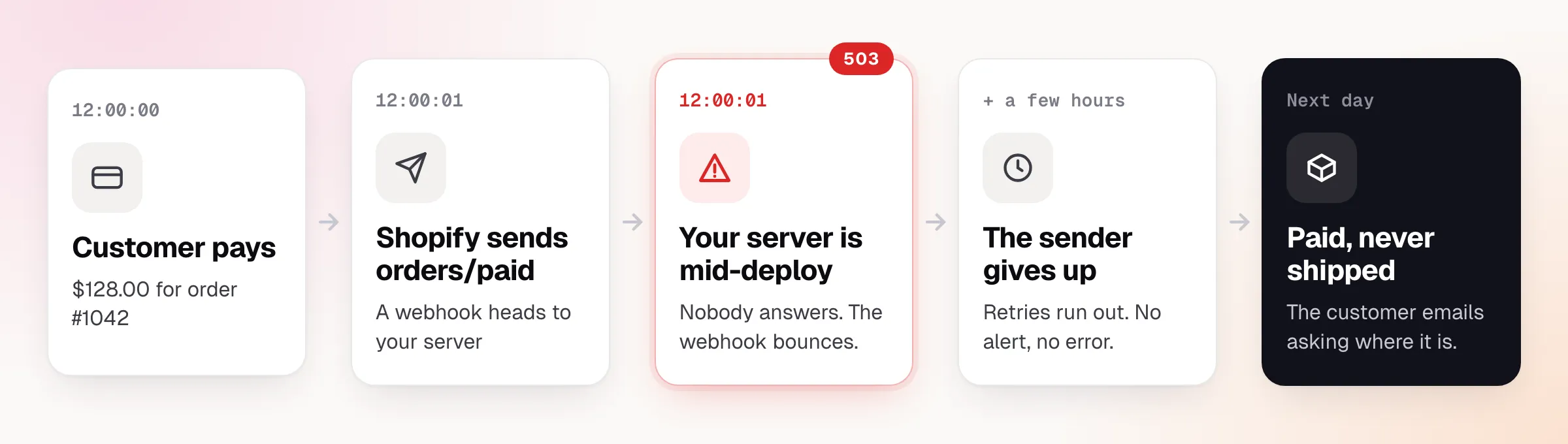
Nothing in that chain is unusual. Deploys happen. Servers restart. Providers do retry, but only for a limited time, and each one has its own rules. When they stop, they stop silently.
Beyond the deploy window, five things regularly cost stores orders:
| What happens | What it looks like from the outside |
|---|---|
| Your server is down or slow for a minute (deploy, restart, cold start) | An order is paid but never reaches fulfilment |
| A provider gives up retrying after its limit | The same, but hours later, with no error to find |
| The same event arrives twice because the provider retried | A refund issued twice, or an order packed twice |
| A sale spike sends thousands of events in seconds | Your API falls over, then you lose more events |
| A signature check is missing or wrong on one endpoint | Fake or tampered events are accepted as real |
And the worst part: you usually find out from the customer. Without a record of each event, “did we get that order?” turns into hours of digging through server logs.
What it costs
The direct cost is a delayed or cancelled order. The indirect costs add up faster:
- Support load. Each missing order becomes a “where is my package?” ticket, handled by a person.
- Oversold stock. If inventory updates ride on the same messages, a lost event leaves the shelf count wrong.
- Money mismatches. Payments, orders and refunds disagree between your store, your CRM and finance.
- Lost trust. A customer who paid and heard nothing rarely gives you a second chance.
Most of these are quiet, so they get blamed on “a glitch” rather than traced to their cause.
The fix: put a gateway in front of your systems
Instead of Shopify and Stripe talking straight to each of your services, they talk to one always-on inbox that sits in front of everything. That inbox accepts each event immediately, keeps it, and then delivers it to each system when that system is ready.
Ensue Gateway is built for exactly this. Here’s what a typical store setup looks like:
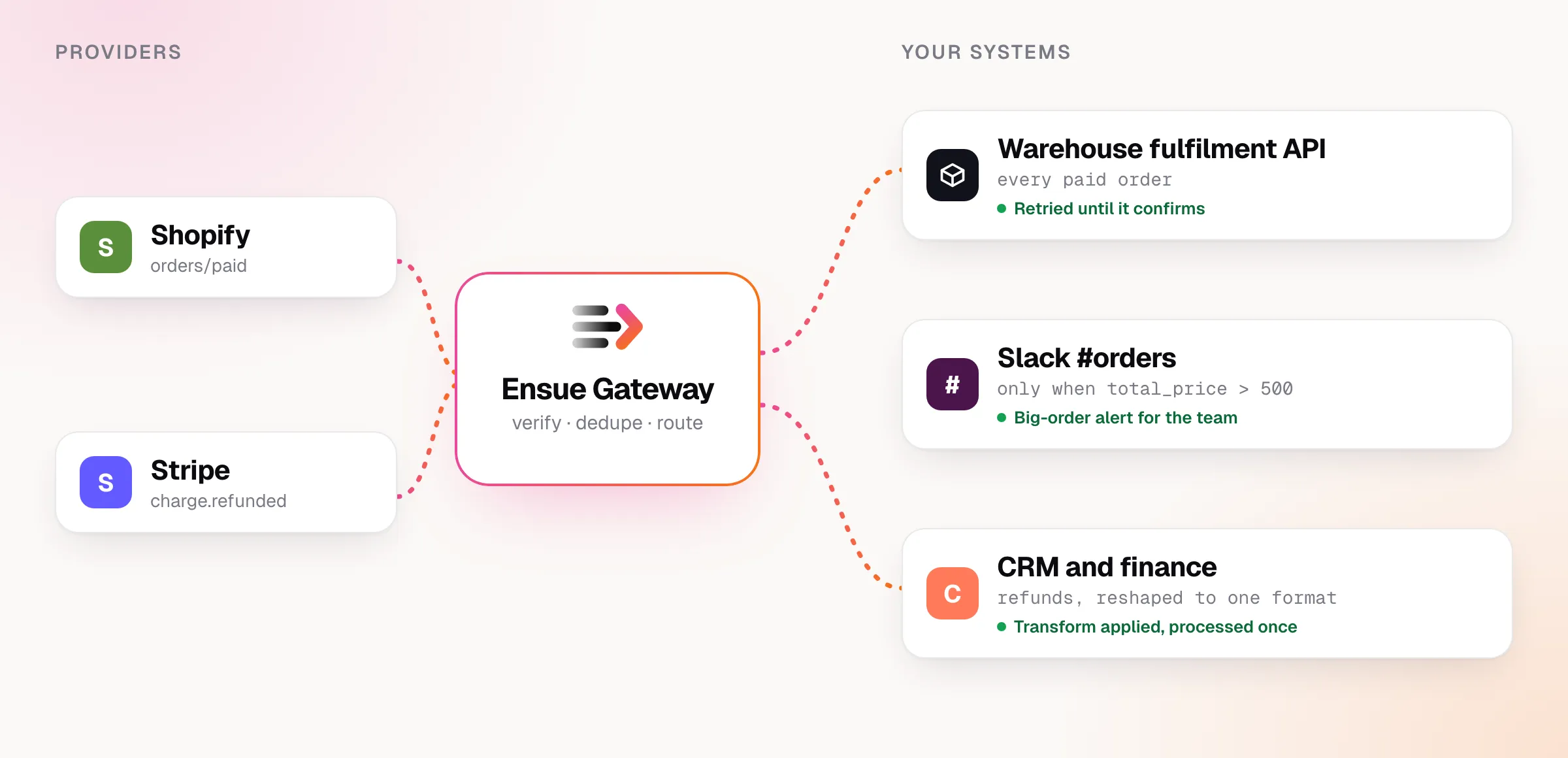
One source, many destinations, each with its own rules. Three things in that picture matter most for protecting orders.
1. Orders are accepted even while you’re down
Ensue answers the sender in milliseconds and stores the event first. A deploy, an outage or a restart on your side no longer decides whether an order is received. Delivery happens afterwards, and keeps trying until your system confirms.
2. Each system gets only what it needs
Different teams care about different slices of the same stream. You set that up with filters on the payload, for example:
Shopify orders/paid      →  Warehouse fulfilment API      (every paid order)
Shopify orders/paid      →  Slack #orders                 (only if total_price > 500)
Stripe  charge.refunded  →  CRM and finance               (reshaped by a transform)
A transform turns each provider’s payload into the one shape a destination expects, so you don’t write translation code for every system. For instance, to give finance only what it needs from a refund:
{
  "customer": data.object.customer,
  "amount":   data.object.amount_refunded,
  "currency": data.object.currency
}
3. A failing system is protected from your traffic
If your warehouse API starts erroring, hammering it with retries makes recovery slower. Ensue pauses that destination, holds the events safely, and sends a probe now and then. When the API recovers, the held orders drain on their own. (See Circuit breaker.)
Duplicates: how not to refund twice
Providers resend events whenever they don’t get a quick reply, so the same refund can arrive twice. If your system acts on both, the customer is refunded twice.
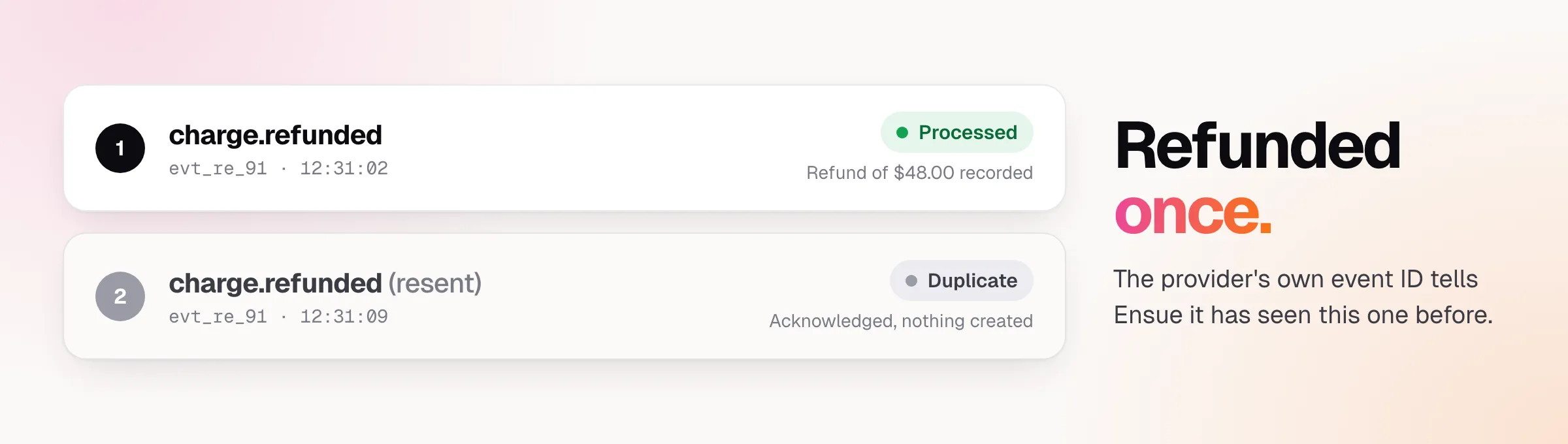
Ensue uses the provider’s own event ID to recognise a repeat. The second copy is acknowledged, so the provider stops resending, but nothing is created. Your handlers still deserve to be idempotent as a second line of defense, but the common case is covered before it reaches them.
What it looks like on a bad day
Say your warehouse API goes down at lunchtime on a sale day. Here is the events screen:
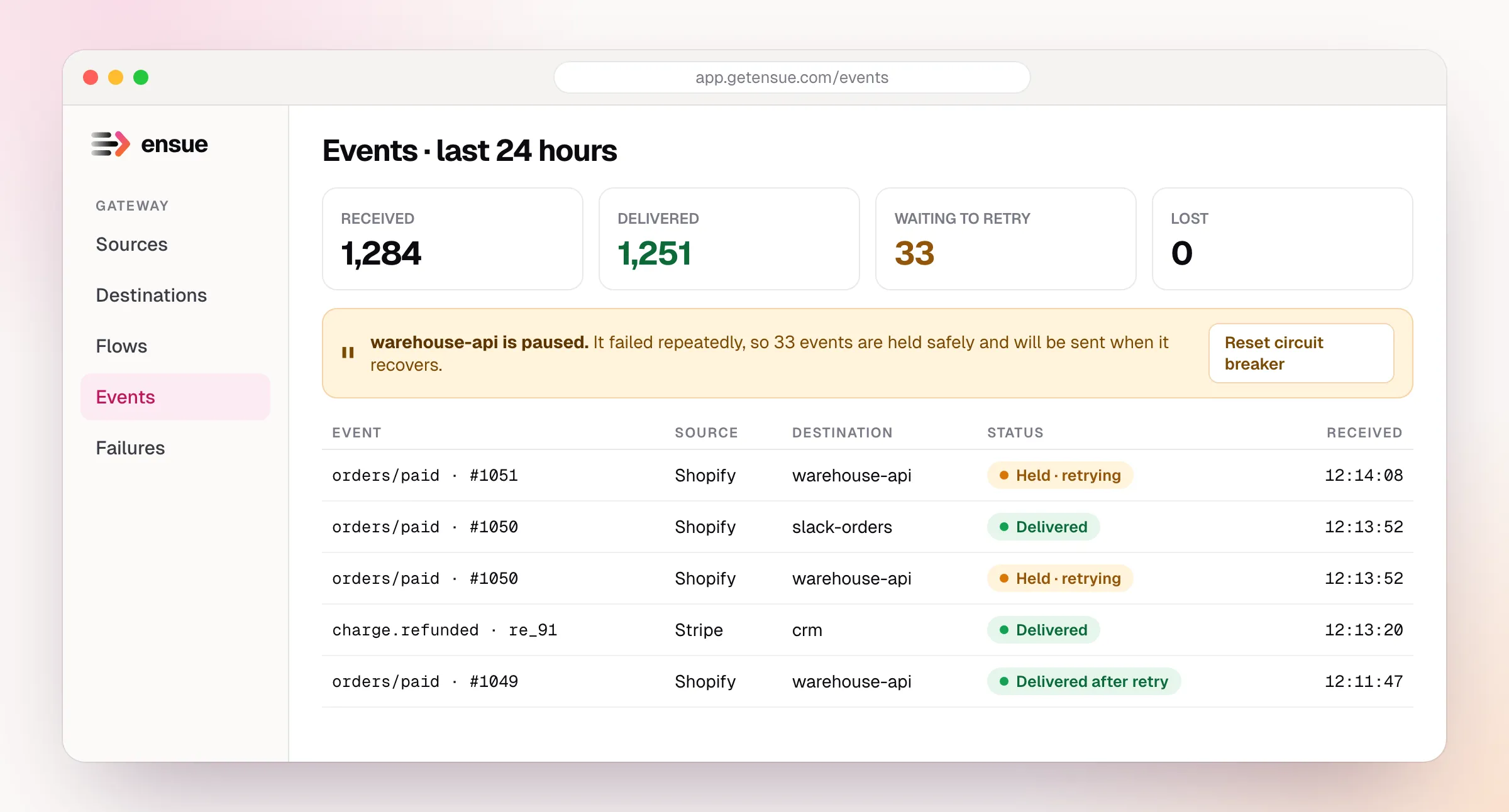
Three things are worth noticing:
- Nothing is lost. The 33 orders the warehouse hasn’t taken yet are waiting, not gone.
- Everything else carries on. Slack and the CRM still get their events on time.
- You can see it. The banner, the counts and the status on each order tell you exactly where things stand, without opening a log file.
When the API is back, the held orders are delivered. If you fixed a bug in your own handler and need to reprocess a window of orders, you can replay them from the dashboard.
Setting it up
A basic order pipeline takes about an hour. Roughly:
- Create a source for each provider (Shopify, Stripe) and paste its URL into that provider’s webhook settings. Choose the right verification method so fake requests are rejected.
- Create a destination for each system: warehouse API, Slack, CRM.
- Connect them with flows, adding filters (like the
total_price > 500rule) and transforms. - Set a delivery policy per destination. For a warehouse API with its own rate limits, set a maximum delivery rate so a flood of orders queues and drains steadily.
- Send a test order and watch its timeline in the dashboard.
A pre-sale checklist
Before your next big sale, make sure you can answer yes to each of these:
| Question | Why it matters |
|---|---|
| Does every provider webhook point at a URL that is accepted even when your servers are down? | Deploys and spikes stop being order-loss events |
| Is every incoming request verified? | Fakes can’t create orders or refunds |
| Are duplicates dropped before they reach your handlers? | No double refunds or double shipments |
| Does each destination have a retry and rate policy? | Failures recover without a flood |
| Can you see every event’s status in one place? | You find problems before customers do |
| Can you replay a missed window? | A bug fix doesn’t mean lost orders |
If any answer is “no” or “not sure”, that’s where orders go missing.
Frequently asked questions
Doesn’t Shopify already retry failed webhooks? It does, for a limited time and by its own rules. Once those run out, the event is gone and nothing tells you. Other providers behave differently again. A gateway gives you one consistent, observable policy across all of them.
Will this slow down checkout? No. Webhooks happen after the customer has paid. Ensue answers the provider in milliseconds, and your systems receive each event shortly after.
Do I need to change my store or my code? No. You change a webhook URL in each provider’s settings so it points at Ensue. Your own services can stay as they are.
What if my handler already processed an event and I replay it? Replays can run a handler twice, so key your handlers on the event ID. That’s good practice with or without a gateway.
What about inventory? Inventory updates usually ride on the same order events, so protecting those events protects your stock counts too.
Set up a source, a destination and a flow in minutes, with verification, retries and a full timeline built in.
Start the quickstart →